Nutanix rolls out hybrid cloud infrastructure for AWS


Sabina Weston

11 Aug, 2020

Nutanix has announced the general availability of Nutanix Clusters on Amazon Web Services (AWS) with the aim to expand the use of its hyperconverged infrastructure (HCI) software to the public cloud.

According to the company, rolling out its infrastructure to AWS will accelerate digital initiatives and optimise spending, which are some of the most significant priorities for businesses during the coronavirus pandemic.

Nutanix will offer a single stack capable of integrating compute and storage, as well as provide unified operations and license portability across private and public clouds.

The company  outlined the key features of its Nutanix Clusters, such as apps and data mobility, optimisation of cloud investments, and a built-in networking integration with AWS.

The software will  allow users to create, manage, and orchestrate their infrastructure and applications across private and public clouds using a single interface, and customers will also have the choice to either reuse existing on-premises hardware or AWS credits when building out a hybrid environment.

They will also be able to choose between bringing the on-premises licenses or selecting a pay-as-you-go or Cloud Commit models.

Doug Yeum, head of Worldwide Channels and Alliances at AWS, said that this will provide users with «the flexibility to get the most out of both their AWS and Nutanix environments».

«Customers now have an opportunity to take advantage of Nutanix Clusters on AWS to deploy adjacent to their cloud-native applications in AWS and fast track their digital transformation,» he added.

Nutanix CCO Tarkan Maner said that the rollout will enable «complete flexibility by allowing businesses to write code once and use it anywhere, taking advantage of scale, location, integration, and pricing of multiple options – this is the true vision of hybrid cloud».

«As the industry evolved, our focus has expanded beyond the data centre to help our customers manage the complexity of multiple clouds, whether private or public. Nutanix Clusters on AWS is the realisation of this vision,» he said.

The launch comes a week after a number of announcements from AWS. Earlier this month, the cloud giant announced a partnership with financial tech firm Global Payments as well as named digital engineering services provider Infostretch as a new advanced consulting partner in its Partner Network. 

Parallels Desktop 16 Tech Guarantee


The Parallels team is excited to bring our users Parallels® Desktop 16 for Mac, which is packed with new features. Qualifying users who recently purchased a license to Parallels Desktop can upgrade to version 16 for free. 

With the Parallels Desktop Tech Guarantee, users who purchased and registered a copy of Parallels Desktop 15 from the Parallels online store (parallels.com) or an authorized reseller between August 1 and September 30 are eligible to upgrade to Parallels Desktop 16 at no additional charge, subject to certain conditions.


The conditions covering eligibility for an upgrade include:

  • Upgrade to the next version of Parallels Desktop at no additional cost if you purchased and registered Parallels Desktop 15 for Mac between August 1, 2020, and September 30, 2020.
  • Product must be a qualifying product, as mentioned in #1 below. Non-qualifying Parallels Desktop products are explained in #3 below.
  • Must be purchased from an authorized retailer. Non-authorized retailers are detailed in #4 below.

1. The following Parallels Desktop 15 for Mac products qualify for the Tech Guarantee:

  • Parallels Desktop 15 for Mac Full Version (New Licenses)
  • Parallels Desktop 15 for Mac Upgrade (Upgrade Licenses)
  • Parallels Desktop 15 for Mac Student License
  • Parallels Desktop 15 for Mac Original Equipment Manufacturer (OEM) Version when purchased together with hardware or other approved software products (OEM License)

Additionally, your product must be registered on or after August 1, 2020, and before or on September 30, 2020.

2. How do I receive my upgrade key?

Eligible Parallels Desktop users who purchased and registered their product after August 1, 2020, and before September 30, 2020, will have upgrade keys automatically added to their Parallels MyAccount. The upgrade license key will be sent to the email used to register your license for Parallels Desktop 15. You should receive the Parallels Desktop upgrade key within seven (7) days after the new version of Parallels Desktop becomes available. 

3. The following Parallels Desktop for Mac products do not qualify for the Tech Guarantee:

  • Trial versions of Parallels Desktop for Mac
  • Licenses sold under the Volume License Program, including PIK/PIKA, Parallels Desktop for Mac Pro Edition licenses and Parallels Desktop for Mac Business Edition licenses
  • Not-for-resale (NFR) versions
  • OEM versions that are purchased unlawfully without hardware or qualifying software
  • Parallels Desktop for Mac versions purchased and registered before August 1, 2020, or after September 30, 2020

4. Non-authorized retailers and resellers include but are not limited to: 

Due to the sheer volume of global Parallels Desktop users, please follow the steps above before contacting the Parallels Support team. Key(s) will be automatically sent to your email address, so check the spam/junk folder. Again, we ask for users to please allow up to seven (7) business days for your key to be delivered. 

Parallels Desktop subscription users: Don’t worry, if you have an active annual subscription of Parallels Desktop, Parallels Desktop Pro Edition or Parallels Desktop Business Edition, you’re already eligible for an upgrade to the latest version. Parallels Desktop subscription users automatically get access to the newest version at no additional cost. 


If you’ve read the above but still have questions about the Parallels Desktop 16 tech guarantee, please don’t hesitate to reach out to our teams. We’re here to help with your questions or concerns via our social support on Facebook or Twitter, 24/7. 

– The Parallels Team

The post Parallels Desktop 16 Tech Guarantee appeared first on Parallels Blog.

Parallels Desktop 16 System Requirements and Supported Guest Operating Systems


The system requirements and supported guest operation systems (OSes) for Parallels Desktop 16 for Mac are fully detailed below. We encourage every potential or existing user to explore the requirements prior to downloading or purchasing Parallels® Desktop. Users may be pleasantly surprised at the incredible performance of Windows, Linux, and other popular OSes on their Mac with Parallels Desktop. 

Supported Apple Mac hardware configurations:

Check your Mac hardware to ensure you can run Parallels Desktop without experiencing compatibility issues. Our team would love to make sure every user gets the most out of Parallels Desktop and the virtual machines (VMs) they create. 


Minimum Requirements Recommended for Best Performance 
Processor Intel Core 2 Duo, Core i3, Core i5, Core i7, Core i9, Intel Core M or Xeon processor Intel Core i5, Core i7, Core i9 or Xeon processor
 
Memory 4 GB of RAM 16 GB of RAM or more
Storage 500 MB for Parallels Desktop application installation Additional disk space for the guest operating system (at least 16 GB is required for Windows 10) Solid-state drive (SSD)
Graphics Intel, AMD Radeon or NVIDIA AMD Radeon Pro graphics card
Operating System macOS Big Sur 11.0 (when released) macOS Catalina 10.15.3 or newer
macOS Mojave 10.14.6 or newer
macOS High Sierra 10.13.6 or newer
macOS Big Sur 11.0 (when released) DirectX 11 requires at least macOS Mojave 10.14, but works best on macOS 10.15.3 Catalina or newer

Important Note: Internet connection is required for product activation, updates and select future features.

Supported guest operating systems that can be created as Parallels Desktop virtual machines:

  • Windows 10
  • Windows 8.1
  • Windows 8
  • Windows Server 2019
  • Windows Server 2016
  • Windows Server 2012 R2
  • Windows 7 (SP0-SP1)
  • Windows Server 2008 R2 (SP0-SP2)
  • Windows Vista Home, Business, Ultimate and Enterprise (SP0-SP2)
  • Windows Server 2003 R2 (SP0-SP2)
  • Windows XP (SP0-SP3)
  • Windows 2000 Professional SP4
  • Windows 2000 Server SP4
  • Boot2Docker
  • Red Hat Enterprise Linux (RHEL) 8, 7 and 6
  • CentOS Linux 8, 7 and 6
  • Fedora Linux 32, 31, 30 and 29
  • Ubuntu 20.04, 19.04, 18.04 LTS and 16.04 LTS
  • Debian GNU/Linux 9 and 8
  • Debian GNU/Linux 19
  • SUSE Linux Enterprise 15
  • openSUSE Linux 15.1 and 15
  • Linux Mint 20, 19 and 18
  • Kali 2019 and 2018
  • Elementary OS 5.0
  • Manjaro 18
  • Mageia 7 and 6
  • Gentoo Linux **
  • Solaris 11 and 10 **
  • openBSD 6 **
  • FreeBSD 12 and 11 **
  • openVZ 7
  • eComStation 2 and 1.2 **
  • ReactOS 0.4 **
  • Android OS*
  • macOS Big Sur 11.0 (when released)
  • macOS Catalina 10.15
  • macOS Mojave 10.14.x
  • macOS High Sierra 10.13.x
  • macOS Sierra 10.12.x
  • OS X El Capitan 10.11.x
  • OS X Yosemite 10.10.x
  • OS X Mavericks 10.9.x
  • OS X Mountain Lion 10.8.x
  • OS X Lion 10.7.x
  • OS X Lion Server 10.7.x
  • Mac OS X Snow Leopard Server 10.6.x
  • Mac OS X Leopard Server 10.5.x
  • and many more…***

*Only the version downloaded with the Parallels Desktop Installation Assistant

**Parallels Tools are not available for this operating system

Note: Parallels Desktop emulates PC hardware, so operating systems that are not present in this list can work as well. We encourage users to download a free 14-day trial of Parallels Desktop first to install the OS of your choice. If it doesn’t work and you believe it should be supported, let us know at Parallels Forum.

Parallels Tools for Linux requires X Window System version 1.15-1.20 and Linux Kernel version 2.6.29-5.1.


Moving your PC?

Below are the Windows PC system requirements to move a PC to your Mac and use it as a Parallels Desktop VM (using Parallels Transporter Agent):

  • 700 MHz (or higher) x86 or x64 processor (Intel or AMD)
  • 256 MB of RAM
  • 50 MB of available hard disk space for installation of Parallels Transporter Agent
  • Ethernet or WiFi network adapter for migrating over network
  • External USB drive for migrating via external disk
  • Supported Windows: Windows 10, Windows 8.1, Windows 7, Windows Vista, Windows XP, Windows Server 2003 and Windows 2000*

*To migrate Windows Vista or older, Transporter Agent from Parallels Desktop 13 should be used.


We sincerely hope this resource helps you navigate your experience with Parallels Desktop. Since 2006, Parallels has delivered excellence by being the #1 choice of Mac users to run Windows on Mac without rebooting. Please don’t hesitate to reach out if you need help. The Parallels support team can be contacted on Facebook or Twitter, 24/7. 

The post Parallels Desktop 16 System Requirements and Supported Guest Operating Systems appeared first on Parallels Blog.

Just Released! Parallels Desktop 16 for Mac


It’s finally here! We’re so excited to introduce a new version of Parallels® Desktop: Parallels Desktop 16 for Mac.  

With Parallels Desktop, you can run Windows, Linux and other popular operating systems on your Mac without rebooting. For 14 years, we’ve been the #1 solution for over 7 million users worldwide. 

Learn more about the hottest new features in Parallels Desktop 16—and stay tuned for more blog posts coming this week detailing everything you need to know about Parallels Desktop 16. 

What are the top new features in Parallels Desktop 16? 


Incredibly fast  

This version of Parallels Desktop is THE fastest version ever released. It starts up twice as fast as previous versions. Plus, Windows resumes and quits up to 20% faster.  


Improved graphics 

Parallels Desktop 16 users can now run even more graphic-heavy, resource-hungry Windows apps with ease. Version 16 delivers up to 20% faster DirectX 11 and improved OpenGL graphics support for both Windows and Linux so you can run more Windows applications and games, including DIALux evo 9, ProPresenter 6, Samson Connect and more. Plus, the new version includes the world’s first support for applications with 3D capabilities running in a macOS Big Sur VM. 

Parallels Desktop users collectively run more than 200,000 Windows applications and with Parallels Desktop 16 can run even more applications.  


Ready for macOS Big Sur and other OSes 

Parallels invested more than 25-person-years of engineer programming to take full advantage of the new architecture in macOS Big Sur. We also revamped kernel extensions to deliver our best Windows-on-Mac performance ever. That’s why we’re proud to say that version 16 is optimized for macOS Big Sur 11.0 (when released) with a refreshed design, easier setup, and much more. Plus, our developers continue to update Parallels Desktop for future releases of Windows, macOS and Linux. 


Better productivity 

  • Wouldn’t it be nice to get extra screen time while traveling? Windows in Travel Mode now uses less energy and extends battery life by up to 15%. 
  • 10% of Parallels Desktop users are short on available disk space. We’ve included a feature that will help you better manage disk space, with the option to reclaim available disk space to Mac automatically. 
Reclaim space Parallels Desktop
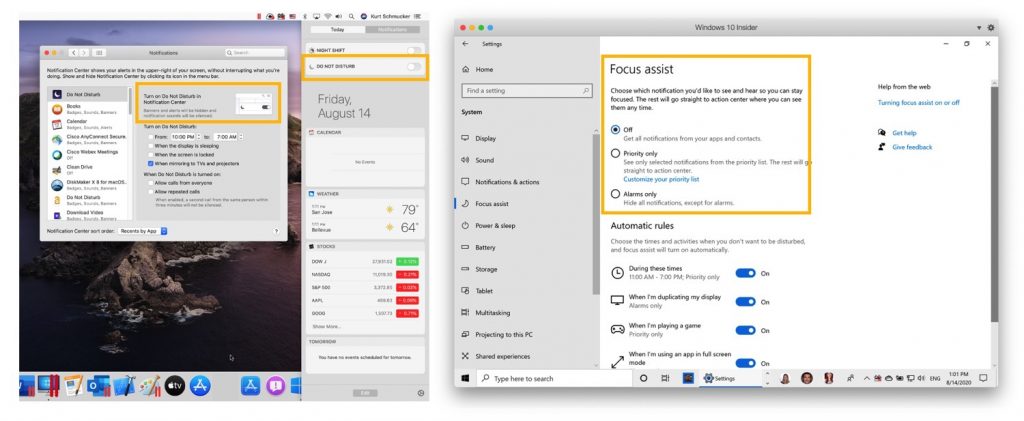
  • Set Do Not Disturb on your Mac and Parallels Desktop will make sure that Windows 10 doesn’t disturb you either. This is especially useful when you’re in an important presentation. 
  • Do you usually work with a Trackpad instead of a mouse? Now you can zoom and rotate objects smoothly in Windows applications with Trackpad gesture support.  

Enhanced integration 

Every year we develop new features to perfectly integrate Mac and Windows with each other. In Parallels Desktop 16, we’ve added some powerful new features that make it even smoother to run Windows apps as if they were native on the Mac. 

  • Do you want to use duplex printing from Windows applications, with paper sizes ranging from A0 to envelope? Good news—you now can with new print options
Printing Parallels Desktop
  • Now you can confidently work on Mac files in Windows by engaging the “safe removal check” to ensure files in shared folders aren’t accidentally deleted.  

Linux and Mac VMs 

Everyone who is passionate about using Linux virtual machines (VMs) has reason to cheer. With version 16, you can be more productive when working with Git repositories in Linux Shared Folders with up to 75% faster “git status” execution. In just one click, you can use and download the latest Linux distributions including Ubuntu 20.04, CentOS 8, Fedora 32 and Debian 10. Plus, Linux OpenGL improvements now let you run Steam.  

Do you want to achieve picture-perfect quality and performance using macOS Big Sur in a VM? You can now, thanks to the first-in-the-world Metal graphics acceleration in a VM with macOS Big Sur. 


Parallels Desktop and Apple Silicon 

We’re all very excited about this demo shown at Apple Worldwide Developers Conference (WWDC), which depicts a prototype of a forthcoming version of Parallels Desktop running on Mac with Apple Silicon. Parallels and Apple work closely to bring virtualization capabilities to Mac with Apple Silicon. Learn more.


New features in Pro Edition and Business Edition 

For our professional and business customers, we recommend Parallels Desktop for Mac Pro Edition and Parallels Desktop for Mac Business Edition. Of course, all new features of Parallels Desktop 16 are included in these editions. Pro Edition and Business Edition now offer improved virtual machine deployment, including export capabilities to reduce the network load when deploying to many Mac devices on a corporate network. For developers, Parallels Desktop 16 enables users to name their custom networks for more organized testing.  

Check out all new features that are exclusive to Pro Edition and Business Edition.  


Special gift for Parallels Desktop users 

In all subscriptions of Parallels Desktop 16, users get more than 30+ single-click utilities from Parallels Toolbox for Windows and Mac, plus Parallels Access to remotely access your PC or Mac from your iOS or Android device or any web browser.  

Check out all the recently released features in Parallels Toolbox and Parallels Access. 

There are lots more new features to discover! Check it out yourself and let us know which feature you like most in the comments, or on Facebook or Twitter.  


How to get your copy of Parallels Desktop 16  

 If you… 

…are an existing customer, upgrade now
…are a new customer, purchase your copy here—or test it for 14 days for free
…have just recently purchased Parallels Desktop 15, check out our Tech Guarantee to see if you get a free upgrade. 

The post Just Released! Parallels Desktop 16 for Mac appeared first on Parallels Blog.

In the end, email might actually kill off Slack


Bobby Hellard

10 Aug, 2020

There is something inherently ignorable about an email. Ray Tomlinson sent the first one (to himself) in 1971 but he can’t remember what the subject was.  

Email is not particularly cool either; it’s a Gen-X invention that Millennials and Gen-Zs are consistently trying to move away from it with platforms like Slack, which is hellbent on killing it off

Slack doesn’t make any attempt to hide this contempt for email, either. Recently it added a feature to send messages beyond the walls of a company and connect organisations into shared channels. Unfortunately for email, most businesses want these instant cloud-based communications. Not some legacy tech where you can accidentally ‘cc’ in all your contacts.

Yet for some time there has been a growing community of individuals, entrepreneurs and startups that still see value in email in the golden age of cloud computing. They see an opportunity to feed that cloud-based innovation into your inbox and breathe new life into this founding pillar of the Digital Age. Simply put, the innovations that Slack has built to kill email off have, ironically, inspired others to improve it. 

The inbox revolution

In the middle of 2019, a New York Times article drew attention to a startup that promised to revolutionise emails with machine learning-based shortcuts. It was a Gmail plugin called Superhuman that reportedly had an ever expanding waiting list of potential clients, all keen to pay a $30 (£22.8) a month premium for email.  

The company borrows Gmail creator Paul Buchheit’s rule of “every interaction should be faster than 100ms”. It has developed features that it says will “make you feel superhuman”, such as an AI-based email triage (which is actually just a suped up filter), an undo send capability, message scheduling and a few more that sound like very mundane superpowers.

Productivity expert, author and founder of career advice site The Muse, Alexandra Cavoulacos points out that Superhuman is the newest in a long line of startups that claim to improve email. She gave its plugin a go, along with a rival service called Hey (you may have seen it battling Apple in the news). 

“Few have been successful in the long-term, but many have had early user growth and interest,” Cavoulacos explains. “What that indicates to me is that there is a real demand for an improved product. We spend so much time in email that something that has a better user experience or saves you time can be very valuable. 

“We are very used to our existing tools, so the new options have to be that much better to be worth switching – even more so for paid products. Superhuman has focused on speed and shortcuts, quite successfully – when I tested them out I definitely saw better speeds and enjoyed a number of their features. Hey seems to be focusing more on being a better filter – keeping just anyone from taking up your time, mental energy and inbox real estate.”

While apps like Slack have a lot of upsides, Cavoulacos still believes that email has an important role in the modern age and she suggests that instant message platforms have facilitated a move to an immediate response model. And, while there is certainly work that is best done via platforms that focus on real-time collaboration and instant messaging, the more private affair of email still has its place in 2020 and beyond. 

“Email is still the best tool for thoughtful asynchronous communication, which is critical for allowing individuals to control when and how they do their work,” Cavoulacos says. “It is already challenging enough to keep your inbox from becoming your to-do list, with every email becoming a new task for you to do. Add in Slack or other app notifications, and professionals find themselves busy all day, but not productive.” 

Collaboration loops

Like Superhuman and Hey, Boštjan Bregar, the CEO and co-founder of Loop, believes that innovations in cloud-based communications and instant collaboration tools can be imported to your inbox. HBregar has been in the collaboration space for many years but didn’t start with email. In 2016, angel investor and long-term collaborator Ben White suggested he should stop thinking about new, alternative email platforms and instead look at adding collaboration into something already in use. Whereas Slack and Microsoft Teams talk about killing off email, White and Bregar decided to go against the grain to try and modernise it.

“There are about three or four players that are really trying to sort of reinvented email – Dropbox just entered the market a few weeks ago with their solution,” Bregar explains. “So there are quite a few people now figuring out that maybe the solution is not bringing people out of email, but actually bringing all the new stuff into it.”

Loop connects to your existing email structure, whoever the provider may be, and floods it with various shortcuts and efficiency add-ons. It works as an individual performance boost or as a company-wide collaboration tool similar to Slack and Microsoft Teams. For example, when an email comes through that is perhaps more relevant to someone else in your team, rather than cc them in another message, you can @ them, or @ your whole team, and find the right person. From there, documents, resources and anything else required can be pulled in for more instant collaboration between you, your team and also the sender. 

However, as seamless as that sounds, it adds to the concerns raised by Cavoulacos about always-on” culture where the lines between work and life can blur – something that may have been exacerbated for home workers by the pandemic. So, letting the rest of your team, or the world, know you’re currently reading emails may take away that intimacy. 

Bregar doesn’t see it that way, however. In fact, quite the opposite. “It is such an individual tool,” he says. “You’re on your own when you’re in your inbox, you don’t feel there’s anybody else in there. If you use Slack, you feel there are other people there. Any tool you take today that has been put onto the market in the last 10 years, you have this feeling that you’re sort of together. Whereas within the inbox, it’s yours.

“The challenge is how to preserve this ability to be on your own and be effective in doing your stuff while feeling that you have your team there to help you because otherwise, you have to switch between platforms.”

For now, at least, email seems here to stay as it still remains one of the most effective ways to communicate outside your organisation. With add-ons for easier collaboration that imitate what instant messaging-focused platforms offer, maybe it really will be email that triumphs after all.

VMware kills Datrium’s hyperconvergence hardware and OS


Keumars Afifi-Sabet

10 Aug, 2020

VMware has discontinued Datrium’s hyperconverged infrastructure DVX hardware line “effective immediately” a little over a month after acquiring the disaster recovery specialist.

Datrium will stop accepting orders of Datrium DVX hardware from new customers, with existing customers able to make additional purchases up to 31 October 2020, according to an email distributed to Datrium customers, circulating on Reddit.

This ‘last time buy’ programme limits purchases to D12x10D, D12x4C and F24x2D hardware with the DaOS 5.1 operating system only. Existing customers can also renew support up to 31 October 2022, with a maximum support term ending a year later.

Versions of the DaOS operating system earlier than DaOS 5.0, meanwhile, will no longer be supported by VMware beyond 31 October, meaning customers will have to upgrade their systems.

Versions beyond DaOS 5.0 will be supported with critical functionality and security fixes, although customers should no longer expect any new features or added functionality. 

“Unless otherwise agreed to under your maintenance and technical support terms with Datrium, we will continue to provide maintenance and technical support through the end of your current support services period (inclusive of existing support contracts that expire after Oct 31, 2023), which may be amended by Additional Purchases and Support Renewal Order as permitted above,” the letter reads.

“Datrium DVX hardware support will be limited to the existing hardware configurations. Firmware fixes cannot be offered if the components are past end-of-support by the 3rd party component hardware vendor.”

VMware announced plans to acquire the disaster recovery as a service (DRaaS) provider in a bid to expand its current VMware Site Recovery portfolio in early July. Datrium has been insistent the integration of its technology and platforms into VMware’s offerings will feed into efforts to help customers build hybrid clouds by combining the infrastructure of VMware Cloud with Datrium DRaaS.

Although specialising in DRaaS, Datrium had long-hoped to make waves in the hyperconverged infrastructure market, especially with its DaOS operating system and DVX hardware. With its hardware being discontinued, and versions of the operating system before DaOS 5.0 no longer supported by the parent company, this will be a disappointment to customers who’ve invested in Datrium’s product ecosystem.  

IT Pro approached VMware for confirmation on its post-acquisition plans.

Zoom introduces filters and reactions to ‘make meetings more fun’


Keumars Afifi-Sabet

7 Aug, 2020

Video conferencing platform Zoom has introduced a swathe of new features that aim to «liven up your meetings» including filters, reactions, improved lighting capabilities and better background noise suppression. 

Users can choose from a variety of virtual backgrounds, as before, as well as a set of fresh video filters and toggles to alter their appearance while in conversation with their friends, family or colleagues. 

Filters to change the colour or set it to black and white or sepia have been rolled out to add more of a «casual» tone to virtual meetings, which countless workers have had to engage in due to office closures and lockdowns. Zoom also added filters that add unicorn horns, pirate eye patches, or aerospace goggles to participants. The filters can be configured in the settings.

«We believe that people connect better on video, but feeling connected when working from home is still challenging,» Zoom said in a blog post. «The casual and fun elements that bring us together in the office seem to be missing from virtual meeting culture … until now.»

«Zoom wants to empower you to feel your best in virtual meetings, express your individuality, and build moments of fun into your day with some new features that uplevel your video game,» the company added. 

The move appears to address a serious issue with video conferencing fatigue that many remote workers have felt since lockdown began. Research shows that continuous video conferencing leads to weariness due to the way such technology has disrupted the way we naturally communicate with each other.

As part of Zoom’s changes, users can also exert more control over the lighting of their frame, which can make a difference to people who work in rooms that aren’t  well-lit. 

Another useful new addition is improved noise suppression, which can drown out background noise such as building works or children playing, for example. The low setting will allow for soft background music or audio, while high background noise suppression will apparently provide distraction-free audio for important meetings and presentations.

Users delivering presentations can also adjust their virtual background to overlay their frame over slideshows, allowing them to move the video feed to any part of the screen and even resize the window.

The drive to add more fun is significant given the platform’s origins as a business-to-business video conferencing service and could be a nod to the millions of consumers that have flocked to the system during COVID-19. 

Indeed, several other platforms, including Teams and Facebook, have instigated several major platform changes in order to keep up with the Zoom surge, with Zoom’s latest changes perhaps a means of trying to stay on top of the competition.

Image courtesy of Zoom

Facebook extends remote working until July 2021


Bobby Hellard

7 Aug, 2020

Facebook is allowing its employees to work from home until July 2021 due to the continuing spread of the coronavirus across the US.

The social media firm will also give its staff £1,000 to put towards any home office equipment they’ll need.

The decision follows a number of tech companies that have announced similar plans, such as Google, and those that have made remote working permanent for some of their workforces, such as Twitter and Fujitsu. 

«Based on guidance from health and government experts, as well as decisions drawn from our internal discussions about these matters, we are allowing employees to continue voluntarily working from home until July 2021,» a Facebook spokeswoman said in a statement. «In addition, we are giving employees an additional $1,000 for home office needs.»

The company also said it will continue to reopen offices in a restricted capacity, but only where virus mitigation has been in place for at least two months. It is unlikely that many locations in the US will reopen before the end of the year, however, due to the high number of coronavirus cases in the country. 

There was more optimism from Facebook and Google in May, mid-way through the first wave of the pandemic, as both announced plans to reopen offices in July. That has come and gone, but the pandemic still has a strong foothold in America.

Twitter showed a bit more flexibility and forward-thinking with its COVID-19 strategy, offering employees the decision to work from home indefinitely. The social media company also announced it wouldn’t open offices before September, though that may also change due to the continued rise in cases.

Japanese manufacturing giant Fujitsu announced plans at the start of July to make 80,000 workers permanently remote. This also included reducing its office footprint by 50% as part of its post-pandemic future. The plans are only for its employees in Japan at the moment, but Fujitsu hopes to reduce office space by 2022. 

SAP HANA Enterprise Cloud finally brought on-prem


Keumars Afifi-Sabet

6 Aug, 2020

SAP has partnered with HPE to make its HANA Enterprise Cloud available on-premise for the first time through HPE’s infrastructure as a service (IaaS) GreenLake platform.

The partnership will allow customers to keep their SAP software configuration and data on-premise while benefiting from the flexibility of the cloud experience, including the subscription-based model that GreenLake is distributed through.

HPE will supply, install and manage customers’ infrastructure, while SAP will contribute their software through the SAP HANA database, including the full SAP HANA Enterprise Cloud catalogue of apps. These will include both SAP S/4HANA and SAP BW/4HANA.

SAP also claims that HPE GreenLake’s cloud service and compliance analytics tools will allow it to offer on-premise capabilities and application management services traditionally offered through the cloud.

The partnership, an extension of HPE and SAP’s existing relationship, aims to meet a longstanding demand from SAP customers unable to use the firm’s software or systems on-premise. The configuration will be distributed through SAP as a ‘turnkey’ system available on a subscription model, favouring businesses that want to keep their hardware on-premise but shift from a capital expenditure to an operational expenditure model.

“The new deployment model SAP HANA Enterprise Cloud, customer edition is a direct response to customers who want the flexibility and service level of a managed private cloud, but need to keep their systems in their own data centres, such as public sector and regulated industry customers,” said Peter Pluim, SAP’s executive vice president and global head of enterprise cloud services.

“We are planning to make that possible with cloud services from HPE GreenLake and white-glove operations and application management services from SAP, which will help unlock value and create new experiences for our joint customers.”

The SAP HANA Enterprise Cloud customer edition will feature optimised architecture comprising secure, high-performance infrastructure, including compute, storage and networking technologies pre-configured for SAP software. The system will offer an end-to-end infrastructure with HPE GreenLake cloud services, with HPE GreenLake infrastructure certified as being able to scale based on the demands of SAP customers.

Twitter hacker’s virtual trial ‘zoom bombed’ after ID leak


Bobby Hellard

6 Aug, 2020

The virtual hearing for the trial against a teenager accused of July’s mass Twitter hack was cut short on Wednesday after the meeting was hijacked by members of the public.

Prosecutors were in the midst of deliberations over the alleged involvement of a 17-year-old teenager from Florida when their conference call was hijacked by a series of interruptions, including 15 seconds of a porographic clip, according to Krebsonsecurity.

The teenager is thought to have orchestrated the 15 July hack on Twitter, which led to the compromise of a number of high profile accounts. His bond hearing with the Hillsborough County criminal court was held via videoconferencing service Zoom, which has been plagued by security issues throughout 2020.

A notice of the hearing was available via public records, which included joining details and the session’s identification number. In a practice known as ‘Zoom bombing‘, unauthorised users are able to make use of this information in order to repeatedly join a call and interrupt the meeting taking place.

«Less than a minute had passed before one attendee not party to the case interrupted a discussion between the attorney and the judge by streaming a live video of himself adjusting his face mask,» Brian Krebs wrote. «Just a few minutes later, someone began interjecting loud music.»

Jude Christopher Nash, who presided over the hearing, was also «clearly» in charge of administering the video stream, according to Krebs. When the prosecution was interrupted by 15 seconds of the random conversation of an unauthorised guest, Nash reportedly told the participants he was removing the troublemakers as quickly as possible.

What happened next was quite common at the beginning of the year, when the first reports of Zoom bombing first surfaced. One of the unauthorised guests streamed a graphic video clip from Pornhub for roughly 15 seconds. Judge Nash then abruptly terminated the meeting.

Zoom has taken steps to prevent participants from hijacking meetings with settings that hide its information and capabilities to eject unwanted participants, but those settings were not fully used in this case.

The teenager on trial is accused of illegally gaining access to some 130 Twitter accounts, targeting the likes of Jeff Bezos and Bill Gates. It’s believed 36 inboxes were also accessed during the hack, which led to the theft of data from seven accounts, according to Twitter.

Despite the disruption, the Judge ruled not to change the defendant’s bail conditions.