AccelOps, Inc., the pioneer in integrated Security Information and Event Management (SIEM), and Performance and Availability Monitoring (PAM) for on-premise and cloud-based data centers, has announced that it has been recognized in Gartner Inc.’s “Cool Vendors in IT Operations Management 2012” report. The report highlights four vendors with innovative technologies in the IT operations management market.
AccelOps has developed unique software that combines next generation SIEM and PAM capabilities that deliver a unified, “single pane of glass” view of the entire IT infrastructure and applications. AccelOps is deployed by large enterprises and service providers to ensure end-to-end availability, performance, and security regardless of whether their infrastructure is physical, virtual, on-premise or in the cloud. Unlike point solutions for PAM, SIEM and analytics, AccelOps provides IT operations management with comprehensive functionality using a unified code base. It is built from the ground up to eliminate silos and deliver a fully integrated and continuously-learning IT management solution that is significantly faster and easier to deploy than point solution alternatives. It dynamically discovers IT resources and adapts to changing conditions in real-time. AccelOps helps security, network, and operations experts be more effective and proactive by automating complex decisions in real-time and providing rich historical analytics.
Last article discussed several access methods you can have with IBM SmartCloud Object Storage. This article discusses how to have a team folder in the IBM SmartCloud Object Storage so everyone can share.
Assuming you already have an IBM SmartCloud Object Storage account and a Gladinet Team account and you are already checking out the different access clients, such as web portal, desktop drive, file server volume and mobile app. Next step is to check out the team folder and its related features.
Editor’s note: The following was written by Kord Davis from a post originally at KordIndex. Kord is the author of a forthcoming book on Ethics of Big Data. – bg Alexis Madrigal reporting on research conducted at Carnegie Mellon in The Atlantic finds that reading all of the privacy policies we encounter would take 76 work days a year. And […]
CloudBerry
S3 Backup is a powerful Windows program that automate backup and restore
processes to Amazon S3 cloud storage.
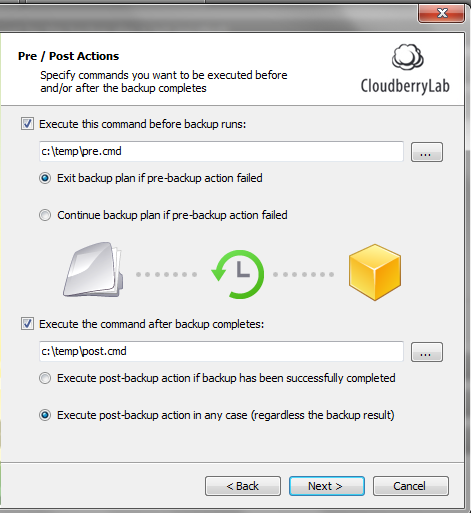
With the latest release you can configure Pre- and Post actions
that will run before and after the actual backup is running.
This feature will make it easier to back up applications
such as SQL Server and Exchange. You can set up a Pre-action to back up SQL
Server and then you can set up a POST action to clean up the SQL Server backup
directory from the older backup files.
To set up Pre/Post action just go to the separate step of
the backup wizard and select the corresponding scripts.
You have an option to exit backup plan if pre-action fails
or continue backup in regardless of the results. you can also run the post-action only if a backup
has successfully completed or in any cases.
As always we would be happy to hear your feedback and you
are welcome to post a comment.
Backing up MS SQL Server
you can now back up SQL Server using the pre-action and then
configure the backup plan to copy the SQL Server .BAK files over to the cloud
storage . To do that you can run one of the following command as a pre-action.
-E -Q «BACKUP DATABASE mydatabase TO DISK=’C:\tmp\db.bak’ WITH
FORMAT»
Overall SQL Server Backup is far beyond the scope of this
article , but we hope this will give you a hint on how you can back up SQL
Server. Check out SQL Server Books Online for more information.
+++
Note: this post applies to CloudBerry
Backup 2.9 and later.
Neil McEvoy is the Founder and President of the Cloud Best Practices Network.
Neil McEvoy is a Cloud Computing entrepreneur who has been pioneering new innovations in this industry for over fifteen years.
Aged 28 he launched his first company, one of the Europe’s first ASPs (Application Service Providers), a joint venture with Microsoft to bring hosted CMS systems to small businesses and funded by the elite of the UK Internet entrepreneur market.
IBM SmartCloud Object Storage is targeted for Enterprise Cloud Storage. Most of the time, it is used for disaster and recovery or as an alternative media storage option. This series of articles discuss other common use cases – team collaboration and
The greatest source of potential use cases for technology is the user community. This is a great reason to attend events where customers are at the center of focus. This was what last month’s Splunk Live DC was like. Splunk is a very user-focused capability and when you create a venue where users can exchange info it […]
Gladinet Solutions has been integrated with Nirvanix Cloud Storage since 2009. It started 3 years ago with simple desktop integration between Gladinet Cloud Desktop and Nirvanix Cloud Storage so you can use a mapped network drive to connect to your
Cloud computing solutions present businesses of all sizes with tremendous opportunities for efficiency and cost savings. It’s no wonder that we seem to have hit a tipping point, where more cloud solutions than ever before are being implemented. Cisco estimates that cloud computing traffic will increase by a factor of 12 between now and 2015.
Still, it’s important to carefully consider your cloud solutions. Not all solutions are created equal. Here are five criteria you need to be considering:
Cost of ownership. If a cloud solution doesn’t lower your TCO, you need to think twice about investing in it. Make sure you’re looking at the total cost comparison of an in-house versus cloud solution. A given cloud solution might require additional Internet bandwidth or infrastructure upgrades, while an in-house solution might require equipment, as well as personnel to manage the equipment.
Reliability. When you turn data needs over to a provider, you need to be able to depend on them. Make sure your cloud solutions provider has a solid record in terms of uptime, and that their support staff are knowledgeable and available when you need them.
Mobile access. One of the major benefits provided by cloud solutions is the ability to access them from multiple types of devices and in myriad locations. Verify that the solution is accessible via smartphones, tablets, laptops, desktops, and any other Internet-capable device your organization might use.
Scalability. Cloud solutions need to be able to expand with your growing business. As your needs increase, it should be as simple as a phone call to your provider to add capacity.
Forward compatibility. One of the downsides to an in-house solution is that the solution is in many ways stuck in time. Unless you replace your server, you probably aren’t going to be able to make significant leaps forward. Cloud solutions should move forward at the pace of technology, keeping up with the latest innovations and making them available to you.
Choosing the right cloud solution for your organization means spending some time going through each of these criteria with potential providers, and then deciding which most suit your needs.
If you haven’t already, many IT organizations are migrating some of their applications to the cloud to become more agile, alleviate operational complexity and spend less time managing infrastructure and servers. The next question you may ask yourself is, “How will we monitor these applications and where should we even begin with so many monitoring tools on the market?”