IT’s role is changing dramatically from working in isolation to operating hand in hand with the business team. Successful IT leaders understand that they need to keep a pulse on the newest technologies and work in unison with their business counterparts in order to remain at the forefront of their industry. By approaching IT service delivery through a business lens, IT is able to streamline processes, lessen the IT management burden, and empower end users. Management Cloud: IT’s Key to the New Front Office, a CA Technologies eBook, has the details on how Management Cloud allows IT to move up the totem pole.
Migrate-Gate: What to do with Windows 2003 End-of-Life
 Deflate-Gate was the topic of conversation the past few weeks. Now that the Patriots are Super Bowl champs we can put this made-up, fake controversy to bed. What isn’t fake, however, is Windows 2003 support ending. What to do with End of Life approaching is a big topic of conversation now. It’s Migrate-Gate!
Tick…Tick…Tick. Does this sound familiar? Tick…Tick…Tick…Windows 2003 Servers support is ending. Tick…Tick…Tick 6-months to go and now it’s time to tick…tick…talk about what you need to do.
Assuming that you haven’t gotten sucked into Cats on Glass photos, many of you are probably aware that support for Windows 2003 Server ends on July 14th 2015. That’s this year…that’s this July! Oh wow, it’s coming faster than another Expendables movie!
Windows 2003 is so old, it knew Burger King while it was still a prince, yet many are still using it. It’s been a reliable and pretty stable product that may give you fits from time to time, but at the end of the day gets you where you need to go. Another way to look at it is that it’s a 1989 Honda Accord (both took CDs). Now, your mechanic is telling you that you’ve dumped too much time, money and energy into your car, except in this case it’s Microsoft telling (eh…forcing) you to upgrade your server.
Why Upgrade?
The big thing starting on July 14th is that there will be no more updates or patches from Microsoft, which can result in a less secure and less stable infrastructure for your business. So what does it really mean?
• Goodbye Updates – Say adios, au revoir, sayonara and beannacht (Gaelic) to updates for fix bugs, performance issues and security vulnerabilities. 2013 saw the release of 37 critical updates for Windows Server 2003/R2. Past the end of life date, these critical issues will remain unfixed, leaving you open to cybersecurity dangers such as malicious attacks or electronic data loss.
• Maintenance Costs – Running legacy servers is not cheap. Intrusion detection systems and advanced firewalls are required to protect a now vulnerable Windows Server 2003 platform. Also, think about all the increasing cost for maintaining aging hardware.
• No Compliance – So once support ends, you’ll still need to meet industry wide compliance standards. Regulations such as HIPAA and PCI require regulated industries to run on supported platforms. Those rules are tougher than the NFL’s PSI policy.
• Software and Hardware Compatibility Issues – New software and hardware devices are no longer being built to integrate with Windows Server 2003. By staying with Windows 2003, you could run into compatibility issues and may not be able to run new instances of software or communicate with the latest devices.
{Whitepaper: Windows Server 2003 End-of-Life Action Plan}
Before July you’ll have three options:
- Do nothing
- Move to an on-prem Windows 2012 environment
- Move your workloads into Azure. Sounds easy, right? Before you do anything here are some tips to consider
Three things to consider:
Analyze your environment: Understand the interaction of the servers in the data center environment. Moving one thing can impact another. Map out what is interacting with what and which users are interacting with which applications. Many reasons why Windows 2003 is being used is because of application dependency due to niche and custom applications.
Migration Licensing: Review short-term and long-term costs of licensing. If you are considering an on-prem solution, understand what your licensing options are. Depending on quantity, customer type and physical vs. virtual there are several licensing programs to consider. Also, with licensing, Microsoft provides backwards compatibility, so Windows 2012 doesn’t necessarily have to be installed. If your application is compatible with an older edition like Windows 2008/R2, volume licensing allows you to run older platforms, so it’s important to work with your application provider to see how these applications can be transitioned to another server operating system. If you are looking to move into the cloud, it’s important to know what your workloads look like to size your Azure service appropriately. Lastly, you need to compare on-prem vs. Azure costs. Do you want to purchase and own the SW with volume licensing or do you want to subscribe to using it in the cloud?
Consider professional services: Who tries to make a soufflé without following a recipe? This is a big deal, so why do it alone? There are many pre and post migrations issues to consider so it would be beneficial to speak with experts who know what they are doing. i.e. GreenPages. (Come on it’s our blog so we can include a plug!)
I would highly recommend registering for our upcoming webinar, “How to Approach a Windows Server 2003 Migration: Key Steps for a Better Transition” for more information. The webinar is being hosted by our Practice Manager of Microsoft Technologies, David Barter on February 19th.
If you haven’t had a discussion about Windows 2003, don’t wait until the last minute as 6 months will come faster than you think.
photo credit: www.cbssports.com
By Rob O’Shaughnessy, Director of Software Sales & Renewals
Red Hat snipes at VMware, calls cloud vision “fundamentally flawed”
(c)iStock.com/soleg
Open cloud provider Red Hat has hit out at end user computing giant VMware in a blog post, describing its recently outlined hybrid cloud vision as “appealing” but “fundamentally flawed in implementation.”
The post, written by Red Hat cloud product strategy general manager Bryan Che, argues VMware’s vSphere and virtualisation technology is not as effective at scaling out cloud apps compared to OpenStack, adding that while you can run both cloud-native and traditional apps with OpenStack on top of vSphere, it doesn’t do either particularly well.
“Virtualisation infrastructure – whether with VMware vSphere or Red Hat Enterprise Virtualization – is not designed to scale out but to scale up traditional applications,” Che wrote. “When these traditional applications need additional capacity, you give them bigger virtual machines. And these workloads depend upon the underlying virtual machines being resilient and never going away.
“The problem then, with running a scale-out cloud like OpenStack on a scale-up platform like vSphere is that vSphere has limited capacity to scale out,” he added. “Once you run so many virtual machines in vSphere, you reach the limit of your cluster.
“This inherently limits the ability of cloud-native apps on OpenStack to scale out horizontally because they will run into the cluster size constraints of the underlying vSphere platform.”
As this publication noted, VMware has unleashed a series of announcements in recent days, launching what was claimed to be the industry’s first unified platform of virtualised compute, networking and storage for the hybrid cloud, alongside a series of new collaborators for its Partner Network. Not everyone was convinced, however – not least because VMware still has plenty of work to do to convince the wider community of its cloud-first vision.
Not surprisingly, Red Hat advocates its own solution, through an open hybrid cloud approach, as superior. “By providing native platforms suited to their particular workloads and the ability to bridge these environments together, an open hybrid cloud offers a no-compromise approach to cloud: optimised traditional apps, optimised cloud-native apps, and a unified experience across them,” Che wrote.
Red Hat uses its blog as a semi-informational, semi-propagandist tool. CEO Jim Whitehurst penned a few thoughts in September over the “huge opportunity” to become the leader in enterprise cloud, for instance. It’s not the first time rival vendors have taken a pot shot at VMware’s strategy, either; following the acquisition of enterprise mobility provider AirWatch in January 2014, Citrix senior director Chandra Sekar posted a rebuttal describing VMware’s vision for end computing as “laughable on many counts”; however, the post was swiftly rubbed out.
There’s at least one body which thinks VMware is doing something right, however – and it couldn’t be any bigger. The White House announced earlier this week that VMware CIO Tony Scott has been appointed the next US CIO.
Read the full Red Hat blog post here.
OpenNebula Systems Joins €3.6 Million Consortium
OpenNebula Systems has nnounced it has joined a consortium of leading organisations and universities from the U.K., Germany, Spain, Belgium, Israel and Italy focused on developing new innovative techniques to federate cloud network resources and to derive the integrated management cloud layer that enables an efficient and secure deployment of federated cloud applications.
The BEACON project will deliver a homogeneous virtualization layer on top of heterogeneous underlying physical networks, computing and storage infrastructures, providing enablement for automated federation of applications across different clouds and datacenters. Head of Research at OpenNebula Systems, Dr. Constantino Vázquez, said:
A Guide to the CIO’s Toolbox By @Vormetric | @CloudExpo [#Cloud]
In my blog from September 2014, I wrote “encryption and access controls are your front-line defenses for defending data-at-rest. Given today’s threat environment, encrypt everything possible, everywhere possible.” While lots of things change in 6 months – the projected World Series Champion, the Super Bowl front-runner, Taylor Swift going from tweeting about dating to tweeting about hacking – this recommendation remains constant.
Data-at-rest is susceptible to many forces, not least of which are malicious and non-malicious insiders. As we noted in our recent 2015 Insider Threat Report, the insider threat landscape is becoming more difficult to deal with as the range of miscreant’s moves beyond employees and privileged IT staff. It now includes outsiders who have stolen valid user credentials; business partners, suppliers, and contractors with inappropriate access rights; and third-party service providers with excessive admin privileges. Unless properly controlled, all of these groups have the opportunity to reach inside corporate networks and steal unprotected data.
Cloud Rationalization By @EFeatherston | @CloudExpo [#Cloud]
There is no arguing the cloud is hot. In a recent blog post The Cloud – Is it your actual destination? I raise the point that the cloud itself is not the destination. It’s a vehicle, a conduit that can help you solve challenges and provide value back to the business. It is a powerful vehicle. IDC forecasts global public IT Cloud services spending to reach nearly $108B by 2017. Gartner expects that by 2016 the bulk of IT spend will be for the cloud. For all the hype, the cloud and its benefits are real.
Generating Pandemic SaaS Sales By @IanKhanLive | @CloudExpo [#Cloud]
Selling is a professional that you can never take lightly. To be successful at marketing and selling something you have got to be the best, on top of your game, ahead of the competition and ready to do what nobody else dares to do. The world of SaaS sales is no different. Competition can be cut throat, with every next company offering the best shiniest object that can help you cure your worst nightmares and keep your numbers and yes the boss happy. That’s far too easy !
Infographic: Top 4 Log Management Challenges By @TrevParsons | @DevOpsSummit [#DevOps]
At Logentries we chat to new users everyday who are looking for an improved solution for centralizing and analyzing their log data. They have often tried rolling their own solution, have previously gone the open source route, or are using an “old school” logging technology.
But, what we find across new users, regardless of how they are managing their log data, are some common challenges that have historically made log management and real-time analytics challenging.
We decided to take our data, along with some similar research from a recent SANs report, and show you some of these challenges, and possible solutions!
What can MSPs gain from linear growth and recurring revenue?
(c)iStock.com/denphumi
By Bernardo Reyes
We’ve reached it, the critical stage between cloud growth and cloud maturity. And there’s no need to deny that with cloud maturity come great opportunities. Just like Uncle Ben said, right? But more seriously, as a Managed Service Provider (MSP), how can you be sure that adding the cloud to your organisation now is right? Did you at all consider the cloud as a more profitable model for your business in 2015?
Understanding recurring revenues
Try to think of an industry that generates billions of dollars and that is based on recurring revenues. Hint: most of us depend – and are highly addicted – to its services. We are so hooked that we’re willing to blindly pay high fees each and every month. And that’s just to access the service. Wondering what industry I’m talking about? Mobile network companies. Yes, cellphone companies are very profitable companies. May I kindly remind you of the billing model they’re using to bill us? The recurring revenues billing model.
Most MSPs are used to the traditional services model, which can be very lucrative when sales are booming, yet it can also be unforgiving if sales are not performing so well.

The beauty of the recurring revenue model resides in its long term profitability. The challenge for MSPs? Manage the rate of churn and keep down to a minimum the number of lost customers. An achievement that should not be too hard to accomplish if you’re offering great customer support.
The model’s fairly simple, each customer generates XYZ amount of profit per month. The more customers are on board, the higher profits are. These 3 charts from the IDC eBook “Successful Cloud Partners 2.0: What IT Solution Providers Need to Know to Build Profitable Cloud Practices” offer a good visual comparison between the traditional services model and the Cloud/Managed services model. You can notice that the recurring revenue model offers more predictability in terms of incoming revenues. Just imagine if you can’t close enough sales during a specific period and don’t reach the predicted profits. Well at least with recurring revenues, you have a safety net and money is still piling up in your bank account.
The eternal quest of a common denominator with customers
Adding the cloud to your offering does not mean you should stop selling on-premises solutions altogether. On the contrary! Offering both gives your end-customers the power of choice. Some are still scared by the cloud, therefore they might choose to stick with an on-prem solution. Others may choose to move half of their solutions to the cloud while keeping the rest in-house.
At the end of the day, you want to know the advantages selling the cloud has for you. Especially in a competitive market like the IT industry where you must stay ahead of the game.
We’re all customers. And as customers, we usually opt for products that are intuitive (just think about the popularity of tablets) and affordable. Basically we want as much as we can for our buck, and we won’t compromise quality. And we want it to be as simple as possible.
The quadrant below explains quite well customer behaviour. Most of us fall in the top left category. And very few of us want to fall in the bottom right category. Why? Because cheap and easy is the way to go. If you run a business, your ultimate goal is to make profits. And to make profits, you want to cut expenses.
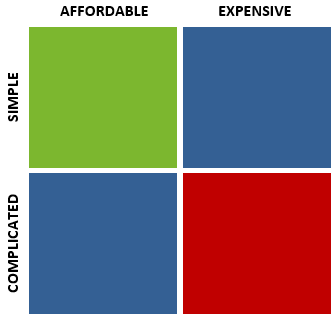 How does the cloud fit in there? Well it’s affordable, especially for SMBs or growing companies, and it’s simple. How? Let’s say your clients already have in-house servers, which have been running for a few years. They probably have IT tech(s) in their team or are very dependable on their service provider. In either situation, this results in high costs and complicated in-house deployments. Plus, the servers need frequent maintenance and will most likely be obsolete in a couple years.
The cloud, on the other hand, grants the access to up-to-date software and services. Migration is seamless and easy: it’s taken care for by professionals. Plus, there is no need to worry about maintaining the hardware, it’s all taken care of. No more insomnia worrying about downtime, cooling of hardware, power outages, etc. Furthermore with the cloud resources are unlimited. You can sell as much as the customer asks for without having to worry about employee turnover and attrition.
Success in the cloud
The key is choosing the right provider. That’s it. There are many well-established companies selling the cloud right now. What’s the most important feature to take into account when you choose your provider? Reliability. When choosing a reliable provider, you offer peace of mind to yourself and your customers.
The post What can MSPs gain from linear growth and recurring revenue appeared first on SherWeb.
End-to-End Monitoring of Critical Apps By @AppDynamics | @DevOps [#DevOps]
Thanks to an early season skiing accident, I found myself sitting in the Emergency Department of a small hospital in a Colorado ski town. The hospital had recently gone through a major renovation and was proud of its investment on HIT (Health care IT). Most patient workflows are now automated.
Check-in and registration were a breeze. Within a few minutes, my patient record was updated, and my case was well documented. With an electronic signature of consent and a scan of my insurance card, all I needed to do was wait for my turn. A large monitor displayed my name as well as the names of others waiting to be seen, as well as the likely waiting time.