IBM SmartCloud Object Storage is targeted for Enterprise Cloud Storage. Most of the time, it is used for disaster and recovery or as an alternative media storage option. This series of articles discuss other common use cases – team collaboration and
Industry Leadership Profile: Neil McEvoy
Neil McEvoy is the Founder and President of the Cloud Best Practices Network.
Neil McEvoy is a Cloud Computing entrepreneur who has been pioneering new innovations in this industry for over fifteen years.
Aged 28 he launched his first company, one of the Europe’s first ASPs (Application Service Providers), a joint venture with Microsoft to bring hosted CMS systems to small businesses and funded by the elite of the UK Internet entrepreneur market.
Backing Up and Restoring to Amazon’s S3 Cloud
CloudBerry
S3 Backup is a powerful Windows program that automate backup and restore
processes to Amazon S3 cloud storage.
S3 Backup is a powerful Windows program that automate backup and restore
processes to Amazon S3 cloud storage.
With the latest release you can configure Pre- and Post actions
that will run before and after the actual backup is running.
that will run before and after the actual backup is running.
This feature will make it easier to back up applications
such as SQL Server and Exchange. You can set up a Pre-action to back up SQL
Server and then you can set up a POST action to clean up the SQL Server backup
directory from the older backup files.
such as SQL Server and Exchange. You can set up a Pre-action to back up SQL
Server and then you can set up a POST action to clean up the SQL Server backup
directory from the older backup files.
To set up Pre/Post action just go to the separate step of
the backup wizard and select the corresponding scripts.
the backup wizard and select the corresponding scripts.
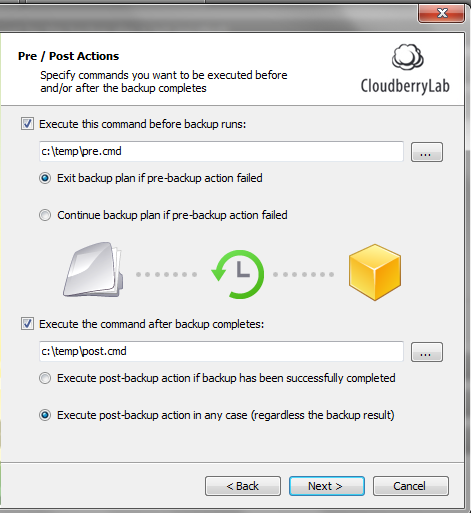
You have an option to exit backup plan if pre-action fails
or continue backup in regardless of the results. you can also run the post-action only if a backup
has successfully completed or in any cases.
or continue backup in regardless of the results. you can also run the post-action only if a backup
has successfully completed or in any cases.
As always we would be happy to hear your feedback and you
are welcome to post a comment.
are welcome to post a comment.
Backing up MS SQL Server
you can now back up SQL Server using the pre-action and then
configure the backup plan to copy the SQL Server .BAK files over to the cloud
storage . To do that you can run one of the following command as a pre-action.
configure the backup plan to copy the SQL Server .BAK files over to the cloud
storage . To do that you can run one of the following command as a pre-action.
1) using a script
stored in *.sql file
stored in *.sql file
specify sqlcmd -S . -i “c:\sqlcmd-backup-script.sql”
2) using osql
“C:\Program Files\Microsoft SQL
Server\90\Tools\Binn\osql.exe”
Server\90\Tools\Binn\osql.exe”
-E -Q “BACKUP DATABASE mydatabase TO DISK=’C:\tmp\db.bak’ WITH
FORMAT”
FORMAT”
Overall SQL Server Backup is far beyond the scope of this
article , but we hope this will give you a hint on how you can back up SQL
Server. Check out SQL Server Books Online for more information.
article , but we hope this will give you a hint on how you can back up SQL
Server. Check out SQL Server Books Online for more information.
+++
Note: this post applies to CloudBerry
Backup 2.9 and later.
Backup 2.9 and later.
CloudBerry
Backup is a Windows program that leverages Amazon S3 storage. You can download it at http://www.cloudberrylab.com/backup. It comes
with onetime fee of $29.99 (US) per copy.
Backup is a Windows program that leverages Amazon S3 storage. You can download it at http://www.cloudberrylab.com/backup. It comes
with onetime fee of $29.99 (US) per copy.
CloudBerry
Backup for WHS is a Windows Home Server add-in that leverages Amazon S3 storage. You can download it at
http://www.cloudberrylab.com/whs. It comes
with onetime fee of $29.99 (US) per copy.
Backup for WHS is a Windows Home Server add-in that leverages Amazon S3 storage. You can download it at
http://www.cloudberrylab.com/whs. It comes
with onetime fee of $29.99 (US) per copy.
CloudBerry
Backup Server Edition. is a Windows
program designed to run in server environment that leverages Amazon S3 storage. You can download it at http://www.cloudberrylab.com/server. It comes
with onetime fee of $79.99 (US) per copy.
Backup Server Edition. is a Windows
program designed to run in server environment that leverages Amazon S3 storage. You can download it at http://www.cloudberrylab.com/server. It comes
with onetime fee of $79.99 (US) per copy.
Want to get CloudBerry Backup for FREE? Make a blog post about us!

Size doesn’t matter – controlling Big Data through cloud security
There’s data. And then there’s BIG DATA.
Many of us have been bombarded with the term in many frameworks. There are some professionals that chalk it up to marketing hype or meaningless buzzword.
Personally, I prefer the way Gartner categorises it. That it is more than size. It is a multi-dimensional model that includes complexity, variety, velocity and, yes, volume.
But the pressing issue with this definition of Big Data is how best to secure something so vast and multifaceted. If you recognise the old concept of a network perimeter is antiquated and dangerously narrow, there should be some concern as to corralling all this data and ensuring its transit and storage is protected.
The latter issue speaks directly to compliance needs. Banks and other financial institutions, medical facilities, insurance, retailers and government entities are especially sensitive to the compliance requirements.
However, if your business doesn’t fit …
Team Collaboration Solution Based on Nirvanix Cloud Storage
Gladinet Solutions has been integrated with Nirvanix Cloud Storage since 2009. It started 3 years ago with simple desktop integration between Gladinet Cloud Desktop and Nirvanix Cloud Storage so you can use a mapped network drive to connect to your
Three Use Cases for Splunk
The greatest source of potential use cases for technology is the user community. This is a great reason to attend events where customers are at the center of focus. This was what last month’s Splunk Live DC was like. Splunk is a very user-focused capability and when you create a venue where users can exchange info it […]
This post by AlexOlesker was first published at CTOvision.com.
Five Key Criteria for Choosing a Cloud Solution
Cloud computing solutions present businesses of all sizes with tremendous opportunities for efficiency and cost savings. It’s no wonder that we seem to have hit a tipping point, where more cloud solutions than ever before are being implemented. Cisco estimates that cloud computing traffic will increase by a factor of 12 between now and 2015.
Still, it’s important to carefully consider your cloud solutions. Not all solutions are created equal. Here are five criteria you need to be considering:
- Cost of ownership. If a cloud solution doesn’t lower your TCO, you need to think twice about investing in it. Make sure you’re looking at the total cost comparison of an in-house versus cloud solution. A given cloud solution might require additional Internet bandwidth or infrastructure upgrades, while an in-house solution might require equipment, as well as personnel to manage the equipment.
- Reliability. When you turn data needs over to a provider, you need to be able to depend on them. Make sure your cloud solutions provider has a solid record in terms of uptime, and that their support staff are knowledgeable and available when you need them.
- Mobile access. One of the major benefits provided by cloud solutions is the ability to access them from multiple types of devices and in myriad locations. Verify that the solution is accessible via smartphones, tablets, laptops, desktops, and any other Internet-capable device your organization might use.
- Scalability. Cloud solutions need to be able to expand with your growing business. As your needs increase, it should be as simple as a phone call to your provider to add capacity.
- Forward compatibility. One of the downsides to an in-house solution is that the solution is in many ways stuck in time. Unless you replace your server, you probably aren’t going to be able to make significant leaps forward. Cloud solutions should move forward at the pace of technology, keeping up with the latest innovations and making them available to you.
Choosing the right cloud solution for your organization means spending some time going through each of these criteria with potential providers, and then deciding which most suit your needs.

Top Five Gotchas for Monitoring Applications in the Cloud
If you haven’t already, many IT organizations are migrating some of their applications to the cloud to become more agile, alleviate operational complexity and spend less time managing infrastructure and servers. The next question you may ask yourself is, “How will we monitor these applications and where should we even begin with so many monitoring tools on the market?”
Google to Launch Amazon, Microsoft Cloud Competitor at Google I/O 2012?
Google is very likely to launch a cloud services platform at its annual developer conference, Google I/O next week in San Francisco. It was one of the topics of discussion in the hallways of our Structure 2012 conference. We have since confirmed with multiple sources who are familiar with Google’s plans which include a more comprehensive offering that its current app engine and storage offerings.
R – A Big Data Open-Source Technology To Watch
CIO.com recently published its list of 9 open-source technologies to watch. Hadoop is first on the list, and second up is the R Project: R is an open source programming language and software environment designed for statistical computing and visualization. R was designed by Ross Ihaka and Robert Gentleman at the University of Auckland, New Zealand beginning in 1993 and is rapidly becoming the go-to tool for statistical analysis of very large data sets. It has been commercialized by a company called Revolution Analytics, which is pursuing a services and support model inspired by Red Hat’s support for Linux.