How Johnson & Johnson boosted its performance by lifting Teradata to AWS


Lindsay Clark

6 Nov, 2019

Data has become the engine that drives modern business, and collating and analysing that data is a crucial component of many IT departments’ duties. Most turn to Enterprise Data Warehouse (EDW) technologies, which offer platforms that allow business to centralise their data for easier analysis and processing.

Teradata is among the most well-known EDW platforms on the market, having spent the last 40 years building its reputation providing on-premise EDW hardware and software for customers including General Motors, P&G, eBay and Boeing. It has now transitioned to a cloud-first model and is now available on all three major public cloud providers, following the addition of Google Cloud Platform support on 22 October 2019.

Back in 2017, however, the company’s cloud credentials were not so well-established. That’s why when healthcare and pharmaceuticals giant Johnson & Johnson (J&J) decided to move its data stores to a Teradata-powered cloud infrastructure, the plan was met with surprise and skepticism. In the years leading up to the project, J&J’s senior manager for data and analytics Irfan Siddiqui says, the company became aware its current on-premise platform would not support its burgeoning data analytics requirements demands at an affordable price for very much longer.

“We [had] been experiencing some challenges and thinking about how we transform the traditional data warehouse into a more modern service, particularly around the flexibility, scalability and cost, and we were searching for a solution,” he told a Teradata conference in Denver, Colorado earlier this year.

And so, in 2017 it started to look at migrating its enterprise data warehouse (EDW) system to the cloud, eventually landing on Teradata as the most promising solution provider for its problems.

At that time, the offer of Teradata on AWS was not widely considered mature enough for an enterprise environment, Siddiqui tells Cloud Pro.

Five lessons from Johnson & Johnson’s EDW cloud migration

Identify all the stakeholders involved and begin discussions to identify potential challenges

Start with a small proof of concept to test all aspects of the potential solution

Understand as early as possible the network bandwidth and latency between your on-premise and cloud solutions

Expect some things to go wrong the first time you try them

Engage a strong project manager, who is good with timelines and risk, to be the single point of contact for communicating progress

Practise processes over and over again, including failure scenarios

“When Teradata released its first machine on AWS, and I said I wanted to do a proof of concept for Teradata in the cloud, people who knew Teradata, their first reaction was, ‘What? Why? Really?’.”

However, the commitment from Teradata to show its systems could work in the cloud was so strong Siddiqui found the confidence to go into a proof of concept. Initial trials showed promise.

The 80-terabyte a-ha moment

“Most of us know doing a capacity expansion or migration to new hardware takes in the order of six months but [with AWS] we were able to spin up a formal system with 80TB of data in just 20 minutes. That was one of the ‘a-ha moments’ for us which became the driving force for us to take another step,” he says.

J&J set itself five goals in lifting Teradata to the cloud, Siddiqui says: to migrate three data environments and all its applications by the halfway point of 2019; to offer the same or improved performance compared with the on-premise system; and to increase flexibility and scalability while reducing cost.

This posed a sizeable challenge for Siddiqui’s team, which aimed to support about 300TB of storage, 50 business applications and 2,500 analytics users on to a system capable of handling more than 200 million queries per month.

It also raised some significant questions.

“How are our applications going to perform? How do we migrate? What happens with downtime, and stability and security?” he says. “We had to address these questions, not just for our leadership team, but all the stakeholders across J&J. We had to show how it would benefit each one of us.”

Most applications stay on-prem

Although all the data warehouse workloads would be in the cloud, most of the related analytics applications and data visualisation tools, including Qlik, Talend, Informatica, and Tibco, remained on-premise.

Some applications were split between the cloud and on-premise servers. For example, J&J wanted to spin up application development environments in the cloud when they were required and only pay when using them. “That is the flexibility we did not have our own servers,” Siddiqui says.

Given the migration had to follow an upgrade to the data warehouse production environment, deadlines became tight. The team worked for three months more or less continuously. But by the end of June of 2019, it was able to decommission the on-premise data warehouse hardware systems.

The hard work has paid off for Siddiqui and his team. Extract-transform-load jobs now take half the time compared to the on-premise system. Large Tableau workload performance has improved by 60% and another application’s data loading was cut from more than three hours to 50 minutes.

Beware the desktop data hoarders

Claudia Imhoff, industry analyst and president of Intelligence Solutions, says it makes sense to put enterprise data warehousing in the cloud in terms of scalability and performance, but there are caveats.

“It’s a wonderful place if you have all the data in there. But, unless you’re a greenfield company, nobody has all of their data in the cloud. Even if most operational systems are in the cloud, there are so many little spreadsheets that are worth gold to the company, and they’re on somebody’s desktop,” she says.

“There are arguments for bringing the data into the cloud. It is this amorphous thing, and you don’t even know where the data is being stored. And you don’t care, as long as you get access to it. Some of it’s in Azure, some of it’s in AWS, and some of it is in fill-in-the-blank cloud. And, by the way, some of it is still on-premise. Can you bring the data together virtually and analyse it? Good luck with that,” she adds.

To succeed in getting data warehousing and analytics into the cloud, IT must convince those hoarding data on desktop systems that it is in their interest to share their data. The cloud has to do something for them, she says.

Despite the challenges, enterprise IT managers can expect to see more data warehouse deployments in the cloud. In April, IDC found the market for analytics tools and EDW software hosted on the public cloud would grow by 32% annually to represent more than 44% of the total market in 2022. These organisations will have plenty to learn from J&J’s data warehouse journey.

Meet Azure Arc, a Microsoft platform for those that want a bit of everything


Dale Walker

5 Nov, 2019

Microsoft kicked off its Ignite conference this week with the reveal of its Azure Arc platform, a set of tools designed to simplify the management of deployments across multiple clouds, on-premises, and edge.

The platform also allows for Azure services and management tools to be expanded to new infrastructures, including Linux and Windows Server, as well as all Kubernetes clusters spread across multiple cloud types.

The idea is to create a single, centralised hub so that users can apply existing tools, such as Azure Resource Manager, Azure Shell, Azure Portal, Azure API, as well as its policy and security protocols, across all deployments. This effectively allows customers to run Azure services irrespective of where the deployment resides.

The move symbolises Microsoft’s effort to accommodate customers that are reluctant, or unable, to become entirely hybrid by allowing them to be more flexible in how they use Azure tools. It also extends many of the benefits of cloud to those parts of a business still reliant on on-premises infrastructure or private data centres, which can now be plugged into Azure.

Specifically, the Azure Portal tool within Arc will give customers a unified view of all Azure data services running across all on-premises and cloud deployments, and the Azure Kubernetes Service can be used to spin up new clusters if they run out of on-premise capacity, the company claims.

What will perhaps matter most is that this expanded availability will also allow customers to make use of all the security and compliance tools integrated into Azure, including controlled access and company policy enforcement.

“With Azure Arc, and with it, the arrival of multi-cloud management in Azure, we are now seeing perhaps the biggest shift yet in Azure’s strategic evolution,” argues Nick McQuire, VP and head of Enterprise and Artificial Intelligence Research at CCS. “It means that Microsoft is becoming more attentive to customer needs, but it is also an indication that battlelines of competition in cloud are shifting towards managing the control pane.”

“In embracing hybrid multi-cloud, Azure Arc also validates the big investments made by key competitors over the past 12-18 months most notably IBM’s acquisition of Red Hat and Google Cloud’s Anthos. The stage is set for AWS to follow suit next month at reinvent.”

Microsoft just redesigned its Edge browser to be an essential business tool


Dale Walker

5 Nov, 2019

Microsoft has released a major update for its Edge browser, which introduces a new logo and a host of business-focused features designed to fuse together intranet and internet search.

It’s arguably the first major change of direction for Edge since it migrated to the Chromium source code late last year, and is a clear attempt to reassert itself as a relevant browser.

Currently in preview, the new update introduces the ability to access company intranet directories from within the Edge browser. For example, entering the name ‘Sofia’ into the Edge search bar will bring up the details colleagues that the user is likely to be searching for, based on previous interactions or similar projects.

Another example Microsoft gave was an employee searching for how many days they are allowed to take off for jury duty, with the top result being the company’s own policy taken directly from the organisation’s intranet.

Given that the new version of Edge is built on the Chromium source code, it’s unsurprising to hear that Edge now has performance parity with Google’s Chrome and is now a perfect match in terms of website compatibility. However, the company explained that it was keen to innovate beyond that to remain competitive.

“We see a unique opportunity to bridge the tradeoffs of today’s web search with more complete solutions that Microsoft can uniquely address,” explained Yusef Mehdi, corporate VP of Microsoft’s Modern Life & Devices division. “The irony is that it is easier to find an obscure piece of information on the much larger internet, than it is to find a simple document on your company’s intranet such as a paystub portal, a pet at work policy, or the office location of a fellow employee.”

Employees will be able to use natural language search to find colleague titles, team names, office locations, floor plans, definitions for company acronyms, and a wide set of internal company information, Microsoft explained.

“As company information continues to expand to terabytes, petabytes and zettabytes of information, this will only get more complex,” added Medhi. “We will unite the internet with your intranet with Microsoft Search in Bing so that you can increasingly access more of your important data in a single browse and search experience.”

Drag and drop search

Another feature, known as Collections, allows workers, such as those involved in procurement, to drag and drop items from search results into a list that can be shared to others, complete with all the appropriate images and metadata for those items. It’s also possible to export this list into Excel, which will automatically input the metadata into a spreadsheet.

A product demo also revealed that each user will be given a personalised homepage, which was largely influenced by their account being logged into the Azure Directory. This meant that links and data from the company’s intranet could be displayed in the place of trending news stories.

InPrivate and baseline cookie blocking

Alongside the business update, the company was also keen to showcase its new privacy protections, including default anti-tracking filters, which it has been working on since June, and an incognito mode dubbed InPrivate, which the company claims offers the most effective protection on the market.

“We’re taking a new, more protective stance to help you on the web. ‘Balanced’, which is what we do by default… gives you more protections than any other browser. If you really want to have your data and privacy secure, you’re going to want to with Microsoft Edge.”

These options can be tweaked in the Edge settings. By default, Edge will block all trackers originating from sites you haven’t actually visited, but a ‘Strict’ option is also available, which will block the “majority of trackers from all sites”, and potentially break some website functions that rely on cookies.

The second feature, the InPrivate mode, is pitched as being a more robust version of Chrome’s Incognito. Medhi explained that Chrome’s version “keeps your browsing safe and private, but what you don’t know is that you can be accidentally logged in on Gmail and your search is not private”, referencing this story from earlier in the year.

“When you navigate to a page (in Edge), we will actually prevent you from being accidentally logged in, and all those searches are kept on the machine, they don’t go back to the server.”

Release schedule

A handful of smaller announcements also accompanied the new Edge launch, including an expansion to the App Assure program to cover the new browser, as well as an expansion of the FastTrack deployment program to rollout Edge in Q1 of 2020.

The release candidate for the new Edge browser is available to download now for both Windows and macOS, with the company aiming for general availability by 15th January.

VMware announces Carbon Black partnership with Dell


Bobby Hellard

5 Nov, 2019

VMware has made a slew of announcements at its annual European conference, starting with a partnership with Carbon Black’s cloud and hardware security and Dell PCs.

The Dell-owned company said it was expanding its enterprise endpoint security portfolio to include Carbon Black Cloud to make organisations more resilient against advanced cyber attacks.

The announcements were made as part of the company’s vision of “intrinsic security”, which is about making it more automated, proactive and pervasive across its entire distributed enterprise.

Rahul Tikoo, Dell’s senior VP of Commercial Client, said that cyber criminals are constantly pushing the limits with difficult-to-discover attack vectors, especially those targeting endpoint devices.

“We have to take a multi-layered approach to security,” he said. “With the addition of VMware Carbon Black Cloud as the preferred endpoint security solution for Dell Trusted Devices and Secureworks, our customers can be more secure while doing their best work.”

The company called it a “unique combination of threat prevention”. It said that detection and response functions from Secureworks use AI and machine learning to proactively detect and block endpoint attacks, while security experts can hunt for threats across the endpoint, network and cloud.

“As we continue to build on VMware’s vision for intrinsic security, it’s clear that we are all stronger when we combine the right people and the right technology,” said Patrick Morley, general manager of the Security Business Unit at VMware. “Dell’s selection of VMware Carbon Black Cloud as its preferred endpoint security, in combination with Dell Trusted Devices and Secureworks, serves as continued validation that we are providing a comprehensive form of endpoint protection. We now have the opportunity to work together and further expand our collective ability to keep worldwide customers protected from advanced cyberattacks.”

Along with Carbon Black, there were also updates to the recently unveiled VMware Tanzu portfolio of products and services. These were aimed at transforming how enterprises build, run and manage software on Kubernetes.

Updates included the rollout of a beta program for Project Pacific, as well as the debut of a new VMware Cloud Native Master Services Competency that help customers build Kubernetes-based platforms.

There were also two previews of brand new offerings, Project Path and Project Maestro. Project Path is for cloud providers and Managed Service Providers to adopt new business models and help bring new value, revenue and improved margins to their cloud business.

Whereas Project Maestro promises a cloud-first service that delivers a unified approach to modelling and managing virtual network functions and services.

Why businesses fail to maximise the value of data visualisation

Data visualisation has become one of the hottest tools in data-driven business management over the past few years. As business intelligence software becomes a more central part of companies’ toolkits and data practices, visualisations have improved while concurrently becoming more precise and versatile.

Even so, not every case of a business implementing BI software and data visualisation is a success. Although they are meant to streamline data analysis and comprehension, they can sometimes produce the opposite effect.

A recent survey by Ascend2 revealed that despite their best intentions, many companies fumble their data visualisation implementations and end up doing more harm than good. While this has not necessarily affected the popularity of BI and data visualisation, it does raise some interesting questions about what companies can do right.

The survey shows that while many have had success with their data visualisation and data dashboard strategies, a majority have only been somewhat successful, or worse, unsuccessful. 

Regardless, dashboards and visualisation confer significant benefits for organisations, so they are not likely to go anywhere.

Why some visualisations are less successful

The survey responses indicate that while data dashboards are still being used and developed, the number of companies that are experiencing strong success with them has dropped. When asked about the overall effectiveness of their data dashboard strategies, only 43% of those surveyed described it as very successful. Meanwhile, 54% called it somewhat successful, while 3% were unsuccessful in deploying data visualisations and dashboards.

One of the biggest challenges is that fewer respondents believed they had consistent access to the data they required. A major benefit of dashboards is that they provide only the data that is relevant to each user and exhibits it in an easily digestible manner. However, dashboard design can sometimes go awry and become either too cluttered or too sparse, obscuring important information in the process.

Indeed, the number of respondents who claimed they frequently or always had the right data to make business decisions fell from 44% in 2017 to 43% in 2018.

A focus on a specific type of data visualisation can misrepresent data, while a strong focus on one type of data can exclude up to 80% of a company’s full data stream

Nevertheless, it does appear that visualisations and dashboards are gaining popularity. The survey found that a total of 84% of respondents planned to increase their overall budgets for data dashboards and visualisations to some extent, although most only plan on increasing it moderately.

This is because despite the challenge of successfully implementing a data visualisation strategy, visual language has been proven to improve productivity and efficiency in the workplace.

Why companies will keep investing in visualisations

One big reason many companies undergo less-than-optimal implementations is that they do not have an effective answer to the question, “What is data visualisation?” For many, the definition is as simple as charts made from spreadsheets and basic diagrams. However, today’s business intelligence tools offer a significant variety of visuals that can make almost any data easier to comprehend and actionable.

A report by the American Management Association has found that visualisation tends to improve several aspects of companies’ decision making. According to the AMA, 64% of participants made decisions faster when using a visualisation tool, while another found that visual language can shorten work meetings by up to 24%.

More importantly, the AMA report cites additional third-party studies demonstrating that visual language helps problem solving, improving efficiency by 19% while overall producing 22% higher results in 13% less time.

With that in mind, however, the report by Ascend2 may be cause for concern, or at least a call to action, for many companies employing data dashboards. The importance of design and precision cannot be overstated when planning a data visualisation strategy.

In some cases, a focus on a specific type of visualisation can misrepresent data or make it harder to understand. Other times, a strong focus on one type of data—such as structured data—can exclude up to 80% of a company’s full data stream.

Having a clear deployment strategy that understands an organisations’ specific needs and objectives can also make the process easier. The Ascend2 study discovered that companies which focused on objectives that are more important—instead of those that are more challenging, but less critical—can also help organisations increase their success with data dashboards and visualisations.

Coursing the right plot

Data visualisations will continue to be a central part of organisations’ data practices. The improvements it offers for decision-making, consensus, problem-solving, and more make it a key part of business success. Still, companies should focus their efforts on building data visualisation strategies and data dashboards that give their teams the information they need, and deliver it consistently.

Editor's note: This article was written in association with StudioWorks.

A guide to enterprise cloud cost management – understanding and reducing costs

For the enterprise, managing cloud costs has become a huge problem. Public cloud continues to grow in popularity and top providers, such as Amazon Web Services, Microsoft Azure and Google offer competitive prices to attract enterprises. But your search to save money shouldn't stop there. There are many factors – some of which IT teams initially overlook – that can increase a public cloud bill. Fortunately, organisations can avoid any unwanted billing surprises with a smart cloud cost management strategy.

Enterprises progressing through their cloud adoption need to ensure that they have cost management strategies in place to control their spend as they continue to migrate services to cloud providers. Let’s examine some cloud cost management strategies that you can use to reduce your cloud costs immediately.

The challenges of managing cloud costs

Cloud infrastructure offers many benefits for organisations but it also presents a variety of challenges. The benefits are easily seen – scalability, control, security etc. – but it's also important to understand how moving to the cloud impacts your organisation. A major factor that contributes to the challenge of cloud cost management is the difficulty that organisations have in tracking and forecasting usage. Unpredictable budget costs can be one of the biggest cloud management pain points.

The ability to scale up and down on demand has allowed resource procurement to transition from sole ownership of the finance or procurement team to stakeholders across IT, DevOps and others. Such democratisation of procurement has initiated an ever-growing group of cost-conscious stakeholders who are now responsible for understanding, managing and optimising costs.

Before you move your infrastructure to the cloud, it is important to evaluate how much the public cloud will cost. Like any IT service, the public cloud can introduce unexpected charges.

The first step of a cloud cost management strategy is to look at the public cloud providers' billing models. Take note of how much storage, CPU and memory your applications require, and which cloud instances would meet those requirements. Then, estimate how much those applications will cost in the cloud. Compare your estimates to how much it currently costs to run those apps on premises. Some workloads are more cost-effective when in-house due to data location and other factors.

When using multiple public cloud providers, integration and other factors can lead to unexpected fees. Think ahead and plan application deployments to see where you might incur additional costs. Also, look at your cloud bill and see what you are charged for access, CPU and storage. The ability to track spending across more than one cloud is invaluable.

Before you commit to a cloud vendor, you have to understand your business requirements and examine what a certain vendor is offering. At first glance, most vendors have similar packages and prices, but when you examine them in detail, you might discover, for example, that one vendor has a dramatically lower price for certain types of workloads.

Organisations should also avoid vendor lock-in. Moving workloads from one cloud vendor to another can sometimes be difficult. Organisations sometimes end up paying higher prices than necessary because they didn't do their homework upfront and it is subsequently too difficult to migrate applications or workloads after they are in production.

Key areas where you can cut your cloud costs

To reduce your cloud costs, you must first identify waste by uncovering inefficient use of cloud resources. Cloud cost management is not a one-and-done process, but you can immediately start saving money on your cloud infrastructure costs if you address key areas that account for the majority of wasted cloud spend and budget overruns.

Ensure teams have the direct ability to see what they are spending. It’s easy to get carried away spinning up services, unless you know exactly what you are already spending. Identify what you have, and who owns it. Tag resources with user ownership, cost centre information and created time to give you a better handle on where the spend originates. This information can be used to track usage through detailed billing reports.

Once you have a handle on what your spend is, set budgets per account. Doing this after establishing a baseline ensures that you are setting practical and realistic budgets that are based on the actual usage. Look to whitelist Instance types (RDS & EC2) to only allow instances of specific types (e.g. t2.medium) or of classes (e.g. t2-*), or of sizes (e.g. *-micro, *-small, *-medium).

Prevent staff from provisioning unapproved virtual instances from the marketplace that include software license costs, or from using specific OS or DB engines from vendors with whom you do not have enterprise agreements in place or are too costly to run at scale. Review in which regions you have services running. The cost of services per region can vary as much as 60%. So you need to ensure you are balancing the need with running services in a given region with the cost of doing so. You can use instance scheduling to start and stop instances on a planned schedule. Shutting down environments on nights and weekends can help save you 70% of runtime costs. Look to determine which environments need 24×7 availability, and schedule the rest.

Manage your storage lifecycle by ensuring that you are rotating logs and snapshots regularly and backup and remove any storage volumes that are no longer in use. Ensure that you are using only one Cloudtrail configuration and have added additional ones only when absolutely necessary. Also, ensure that sandbox or trial accounts are only utilised for exploration purposes and for the duration committed.

Another technological solution that can help to reduce operating expenses is the use of containers. Often used by IT teams taking DevOps approaches, containers package applications together with all their dependencies, making them easier to deploy, manage and/or migrate from one environment to another.

Last, but not least, use a cloud cost management vendor. Many organisations decide that tackling these cost optimisation chores on their own takes too much time and skill. Instead, they leverage services from a reputable cloud cost management vendors. Cloud cost management is one of the major pain points various organisations have when migrating to the cloud. Cloud costs can sometimes be difficult to estimate, due to the complexity of the cloud infrastructure. 

https://www.cybersecuritycloudexpo.com/wp-content/uploads/2018/09/cyber-security-world-series-1.pngInterested in hearing industry leaders discuss subjects like this and sharing their experiences and use-cases? Attend the Cyber Security & Cloud Expo World Series with upcoming events in Silicon Valley, London and Amsterdam to learn more.

Platform as a service solutions are secure – as long as they’re not misconfigured

There’s no denying that solutions that optimise data capture business success today. Platforms as a service that handle many aspects of an enterprise’s customer-facing data have revolutionised the way large companies interact with their customers, driving increased personalisation, better service, and higher value interactions.

This flexibility of PaaS solutions such as Salesforce has enabled an amazing 360-degree customer experience and tremendous growth in value. It has also enabled citizen developers to take governance into their own hands, often without the appropriate understanding or controls required to minimise the threat of bad actors, internal or external to the enterprise.

Most PaaS solutions are outfitted with a proactive security framework to enable success, but many CISOs, CIOs, and IT leaders lack the full understanding of the shared responsibility required to ensure ongoing compliance.

There are some common scenarios we’ve all heard of, such as the pharmaceutical rep who brings his book of business with him to a competitor. And then there are more surprising scenarios, like the healthcare organisations that unknowingly expose protected health information to all their customer service reps, or the wealth management companies whose summer interns have access to all the Social Security numbers of their high net-worth customers.

These are vulnerabilities created, more often unintentionally, by admins and developers trying to support the business the best they know how. They are also preventable with the right governance framework and internal controls to limit access.

The robust security capabilities offered by the PaaS often get purchased and “turned on” but don’t actually do anything to provide insights into risks or prevent the actions of bad actors. As with many security capabilities, enterprises unfortunately buy and “turn on” these premium features without an understanding of what their responsibility actually is nor how to create the appropriate governance model based on the real threats.

Why PaaS can be a vulnerability

Platforms as a service offer tremendous security capabilities but can be implemented in an insecure way when data governance is an afterthought. The tremendous flexibility to support the line of business tends to be the driver, with governance and compliance relegated to a last-minute scramble.

Vulnerabilities happen when the wrong people — or maybe worse, everyone within an organisation — receives unfettered access to the data housed within a platform. Granting systemwide administrative access to anyone on the payroll is a recipe for disaster. Why do part-time interns need access to sensitive information like Social Security numbers, loan origination data, and credit card specifics? You guessed it: They don’t. In cases such as these, ignorance is not bliss. It’s dangerous.

The first step in correcting this common mistake is learning exactly what data lives in your enterprise’s PaaS. You need a clear, objective data-governance plan, so everything from compliance needs to shareholder obligations need to be accounted for.

Some questions that can guide your data audit include:

  • What information actually sits in your instance?
  • Where is information being stored?
  • Who has access to the information?
  • Are you meeting compliance requirements?
  • How do we value the data?

How to achieve proper security

It may sound odd, but thinking like a hacker can help shore up your platform’s security. Find the holes and cracks, and work to spackle them shut. Once that’s accomplished, resolve to continuously assess risks and perform mitigation. Staying up-to-date on your security posture requires constant effort, and eating the elephant is easier one bite at a time. Start with figuring out your why and informing an aligned road map forward.

To shore up your platform’s security and protect your data — the lifeblood of your enterprise, implement a few basic steps:

1. Figure out who cares: Determine who in the organisation has expertise, knowledge, and accountability to your PaaS data. If you can’t find owners who care, you should assume your problem is larger than you realise.

2. Start somewhere: Data inventory and classification can be scary, but if you don’t know the data you have, it’s difficult to determine how you feel about it. Start with a simple exercise to learn what is collected and stored in your system. From there, you have context for how you value this data and what are the appropriate controls to put in place.

3. Ask who sees what: Start with some hypothetical scenarios and see what answers come back. Do the right people have access to the right information? Have you applied a privileged access management approach to the data?

Once you’ve started with these basics, you have the knowledge to create an actionable strategy to get where you want to go. Remember, proper security is not a checklist; it’s an evolving journey without a final destination. Your governance journey evolves as your PaaS evolves, one agile sprint at a time.

https://www.cybersecuritycloudexpo.com/wp-content/uploads/2018/09/cyber-security-world-series-1.pngInterested in hearing industry leaders discuss subjects like this and sharing their experiences and use-cases? Attend the Cyber Security & Cloud Expo World Series with upcoming events in Silicon Valley, London and Amsterdam to learn more.

Firefox scraps extension sideloading over malware fears


Keumars Afifi-Sabet

1 Nov, 2019

Support for sideloaded extensions in the Firefox browser will be discontinued from next year following concerns that the function could be exploited to install malware onto devices.

Sideloading is a method of installing a browser extension that adds the file to a specific location on a user’s machine through an executable application installer. These are different from conventional add-ons, which are assigned to profiles, and are also available to download outside official Firefox channels.

From 11 February 2020, the Firefox browser will continue to read sideloaded files, but will copy these over to a user’s individual profile and install them as regular add-ons. Then from 10 March, sideloaded extensions will be phased out entirely.

Mozilla argues that for some users it’s difficult to remove sideloaded extensions completely, as these cannot be fully removed from Firefox’s Add-ons Manager. This has also proved a popular method of installing malware, the firm said.

“Sideloaded extensions frequently cause issues for users since they did not explicitly choose to install them and are unable to remove them from the Add-ons Manager,” said Firefox’s add-ons community manager Caitlin Neiman.

“This mechanism has also been employed in the past to install malware into Firefox. To give users more control over their extensions, support for sideloaded extensions will be discontinued.”

The transition period between February and March has been put in place to ensure that no pre-installed sideloaded extensions will be lost from users’ profiles, given they will have been copied over as conventional add-ons.

Developers have also been urged to update install flows, and direct users to download extensions through either their own web pages or the Firefox Add-Ons hub.

One prominent example of malware installed via side-loading, albeit not on Firefox itself, was a Pokemon Go clone released in 2016 that allowed cyber criminals to gain full control to victims’ smartphones.

Before Pokemon Go was available in Europe, the cyber criminals publicised a non-official version of the app that could be downloaded from sources beyond the Google Play Store.

Which AWS container orchestration platform is best for your organisation? A guide

Container orchestration platforms exist to make container use a whole lot easier. Running any application on a container will make it portable. However, when the time comes to scale or add services, you’re going to run into problems without a platform to manage and stitch it all together, and it will quickly become too difficult to handle.

When it comes to AWS, there are three main options – each with pros and cons. The choice you make will ultimately come down to your business needs and ongoing maintenance capabilities.

To help you decide, here are the pros and cons of each managed service:

ECS: the native choice

Elastic Container Service (ECS) was AWS’ first offering for managed container orchestration. For many, this is the easiest option, and it certainly has the least amount of components to get familiar with.

As a heavily integrated orchestration platform, it’s a great choice for anyone happy with the AWS ecosystem and who wants the benefits and familiarity of AWS services and support. It’s also cost-effective, as you don’t have to pay for the control plane and can use the built-in AWS code tools as well as enjoy fine-grained identity and access management (IAM) for Services and Tasks.

When your business wants to deploy an application onto ECS, the operations can be defined for each application individually, dictating for example which containers have access to S3 and which don’t.

When is ECS not the best choice?

As a proprietary AWS solution, cloning your applications to a different cloud vendor won’t be a simple task if you go with ECS. In addition, the orchestration platform has limited support for routing, currently supporting only path-based routing, and not host-based or header-based routing. Another factor to consider is that ECS is slower to respond to state changes than the others in the Big Three, so if you’re looking to a highly performant solution – it’s not going to be the right fit.

Who is ECS good for?

If you are looking for simplicity with good value for your investment, and these factors aren’t deal breakers for you, ECS is a great beginners option, and perfect for any business without experienced DevOps to operate their orchestration. I recommend it if you have a limited amount of services (<10) to deploy on the cloud. Without the bells and whistles which make the solution more complex, you might find ECS to be preferable for your company.

EKS: the Kubernetes choice

EKS is AWS’ offering of Kubernetes, the open-source container orchestration platform that has become popular. As EKS is a managed service by Amazon, this eliminates a lot of the hassle that comes with the initial installation and maintenance of Kubernetes going forward. Amazon EKS runs upstream Kubernetes. It’s not a different flavor, so you get the same functionality as if you created your own Kubernetes cluster, which makes the platform easy to clone if you want to run multi-cloud in the future.

As an open-source platform, EKS has the benefit of thousands of developers that are working on its technology constantly, actively contributing to functionality and new features. Unique selling points worth mentioning include namespace isolation, where you can split your cluster with logical boundaries, for example limiting developers to using a specific amount of resources of the cluster. Moreover, it provides the ability to run cron jobs and stateful workloads.

EKS offers a much faster deployment time than ECS, with results in a few seconds, allowing you to deploy several times a day and feedback fast for changes. Everything can be declared using the kubectl command line tool, and there are plenty of integrations. These include service-to-service communications and native scaling of both Pods and Worker Nodes, enabling your developers to focus on their business logic and deliver new features. I’d also highlight Helm, a package manager that provides the ability to bundle together several applications or business logic for deploying and updating a whole unit in one piece.

What should you watch out for with EKS?

It’s important to realize that Kubernetes isn’t the right choice for everyone. Your business will have the added cost of the control plane each month, and there is a much steeper learning curve than you would experience with ECS, and currently fewer integrations with AWS overall. Unlike ECS, the IAM to AWS is not built-in, so your developers or DevOps will need to install additional tools for this functionality.

The other serious limitation is pod density, a unique issue to EKS. Every container (pod) is bound to a certain private IP in your VPC, and if your application utilizes many replicas or microservices your cluster will scale but not due to the fact that your instance ran out of CPU or memory, rather that your instance ran out of IPs to allocate to the worker nodes.

This results in additional costs, and can be limiting as your developers will have limited IPs for smaller size instances used by the worker nodes. If your microservices scale quickly and by high volume, this is an important factor to consider.

Who is EKS right for?

The critical question here is, once the installation is complete, who is going to be responsible for taking ownership of it? Managing and maintaining EKS needs dedicated specialists, and if you don’t have the manpower, another option might be a better fit.

Fargate: The container on-demand choice

With Fargate, it’s a whole new game. You don’t have to create your own control plane or instances, there are no clusters needed, no need for infrastructure upgrades or maintenance. Instead, you specify how many resources you want to use, and pay as you go. This gives you the opportunity to focus on the design and build of your applications, rather than spending time worrying about the underlying infrastructure.

The best thing about Fargate is rapid horizontal scaling, the ability to scale on demand. Developers simply create containers and deploy to the Fargate service. Easy set-up, no learning curve.

Fargate is not suitable for stateful workloads, requiring your application to be stateless, which is one of the main reasons why some companies wouldn’t choose Fargate. Additionally, although the ability to scale to tens of thousands in no time is exciting, in reality not many businesses need this functionality, making the cost harder to justify.

Who would be a good fit for Fargate?

Only you can know if your budget suits choosing Fargate rather than investing in a DevOps team, and if the benefits of scaling on demand are worth the higher cost. This is most likely if you have just a handful of services.

For many, Fargate works well as a hybrid solution, allowing your applications to scale where necessary for on-demand tasks rather than using it 24/7. Another consideration is to isolate those workloads with sharp surges in resource usage and run them on Fargate to minimize the impact on the performance of your ECS or EKS clusters.

In closing, EKS is an increasingly popular choice for container orchestration, but that doesn’t mean it’s the right solution for your business needs. Remember, the more features and functionality there are, the more complexity it introduces, and the more resources you will need to manage your ecosystem. It’s in your best interest to make sure that you actually need the bells and whistles before choosing the shiny new thing.

Read more: AWS, Azure or Google: Do the differences between cloud providers really matter?

https://www.cybersecuritycloudexpo.com/wp-content/uploads/2018/09/cyber-security-world-series-1.pngInterested in hearing industry leaders discuss subjects like this and sharing their experiences and use-cases? Attend the Cyber Security & Cloud Expo World Series with upcoming events in Silicon Valley, London and Amsterdam to learn more.

Why cloud IT infrastructure demand continues to fluctuate as 2019 draws to a close

Demand for computer servers, disk storage systems, and networking hardware deployed within an enterprise hybrid cloud environment remains strong. Moreover, the investment in non-cloud on-premises infrastructure seems assured by the CIO and CTO need to deliver superior security and compliance with IT regulatory requirements in several key industries.

According to the latest worldwide market study by International Data Corporation (IDC), vendor revenue from sales of IT infrastructure products for cloud environments — including public and private cloud — declined 10.2 percent year-over-year in the second quarter of 2019 (2Q19), reaching $14.1 billion.

Cloud IT infrastructure market development

IDC also lowered its forecast for total spending on cloud IT infrastructure in 2019 to $63.6 billion, down 4.9 percent from last quarter's forecast and changing from expected growth to a year-over-year decline of 2.1 percent.

Vendor revenue from hardware infrastructure sales to public cloud environments in 2Q19 was down 0.9 percent compared to the previous quarter (1Q19) and down 15.1 percent year over year to $9.4 billion.

This segment of the market continues to be highly impacted by demand from a handful of hyperscale cloud service providers, whose spending on IT infrastructure tends to have significant upward and downward swings. That ongoing fluctuation creates volatility for the IT infrastructure vendors.

After a strong performance in 2018, IDC expects the public cloud IT infrastructure segment to cool down in 2019 with spending reaching $42 billion — that's a 6.7 percent decrease from 2018. Although it will continue to account for most of the spending on cloud IT environments, its share will decrease from 69.4 percent in 2018 to 66.1 percent in 2019.

In contrast, spending on private cloud IT infrastructure has shown more stable growth since IDC started tracking sales of IT infrastructure products in various deployment environments. In the second quarter of 2019, vendor revenues from private cloud environments increased 1.5 percent year-over-year reaching $4.6 billion. IDC expects spending in this segment to grow 8.4 percent year-over-year in 2019.


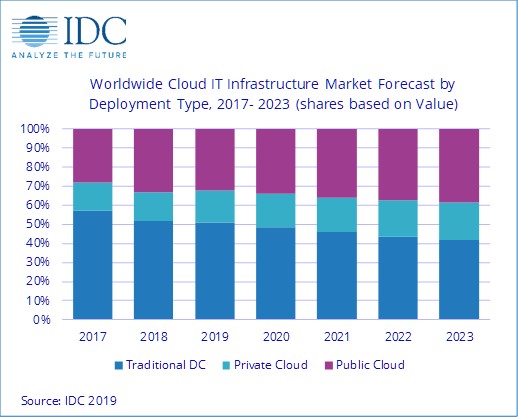
Overall, the IT infrastructure industry is at crossroads in terms of product sales to cloud vs. traditional IT environments. In 3Q18, vendor revenues from cloud IT environments climbed over the 50 percent mark for the first time but fell below this important tipping point since then.

In 2Q19, cloud IT environments accounted for 48.4 percent of vendor revenues. For the full year 2019, spending on cloud IT infrastructure will remain just below the 50 percent mark at 49 percent.

Longer-term, however, IDC expects that spending on cloud IT infrastructure will grow steadily and will sustainably exceed the level of spending on traditional IT infrastructure in 2020 and beyond.

Spending on the three technology segments in cloud IT environments is forecast to deliver growth for Ethernet switches while computing platforms and storage platforms are expected to decline in 2019.

Ethernet switches are expected to grow at 13.1 percent, while spending on storage platforms will decline at 6.8 percent and compute platforms will decline by 2.4 percent. Compute will remain the largest category of spending on cloud IT infrastructure at $33.8 billion.

Sales of IT infrastructure products into traditional (non-cloud) IT environments declined 6.6 percent from a year ago in Q219. For the full year 2019, worldwide spending on traditional non-cloud IT infrastructure is expected to decline by 5.8 percent, as the technology refresh cycle driving market growth in 2018 is winding down this year.

By 2023, IDC expects that traditional non-cloud IT infrastructure will only represent 41.8 percent of total worldwide IT infrastructure spending — that's down from 52 percent in 2018. This share loss and the growing share of cloud environments in overall spending on IT infrastructure is common across all regions.

Most regions grew their cloud IT Infrastructure revenues in 2Q19. Middle East & Africa was fastest growing at 29.3 percent year-over-year, followed by Canada at 15.6 percent year-over-year growth. Other growing regions in 2Q19 included Central & Eastern Europe (6.5 percent), Japan (5.9 percent), and Western Europe (3.1 percent).

Cloud IT infrastructure revenues were down slightly year-over-year in Asia-Pacific (excluding Japan) (APeJ) by 7.7 percent, Latin America by 14.2 percent, China by 6.9 percent, and the USA by 16.3 percent.

Outlook for cloud IT infrastructure investment

Long-term, IDC expects spending on cloud IT infrastructure to grow at a five-year compound annual growth rate (CAGR) of 6.9 percent, reaching $90.9 billion in 2023 and accounting for 58.2 percent of total IT infrastructure spend.

Public cloud data centres will account for 66 percent of this amount, growing at a 5.9 percent CAGR. Spending on private cloud infrastructure will grow at a CAGR of 9.2 percent.

https://www.cybersecuritycloudexpo.com/wp-content/uploads/2018/09/cyber-security-world-series-1.pngInterested in hearing industry leaders discuss subjects like this and sharing their experiences and use-cases? Attend the Cyber Security & Cloud Expo World Series with upcoming events in Silicon Valley, London and Amsterdam to learn more.

The cloud news categorized.